
What Is An
ECTD VIEWER?
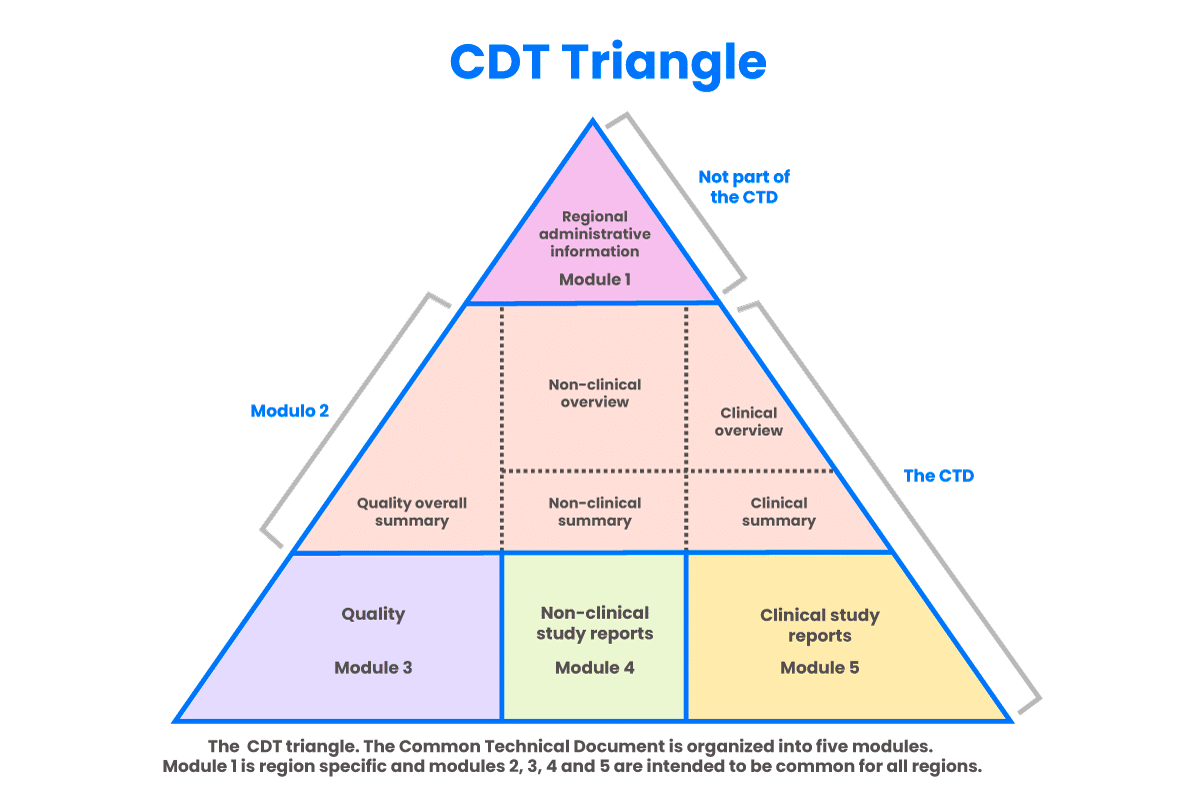
CTD is an acronym for “Common Technical Document,” which is the pharmaceutical industry’s internationally agreed upon format for the preparation of applications regarding new drugs intended to be submitted to the Federal Drug Administration (FDA) and other regulatory authorities in participating countries. The eCTD (electronic Common Technical Document) is the electronic version of this standard.
Beginning on May 5, 2017, companies must use the eCTD format to submit Investigational New Drug Applications (INDs) New Drug Applications (NDAs), Abbreviated New Drug Applications (ANDAs), Biologics License Applications (BLAs) and Master Files. Submissions of Commercial INDs to the FDA must be made in eCTD format beginning May 5, 2018. After those deadlines, the FDA will not receive submissions that do not adhere to the requirements stated in the eCTD Guidance.
In the U.S., the FDA Electronic Submissions Gateway (ESG) is the central transmission point for sending information electronically to the FDA. Within that context, the FDA ESG is a conduit along which submissions travel to reach their final destination. It does not open or review submissions, but instead automatically routes them to the proper FDA Center or Office.

What Is An ECTD Viewer?
Because the eCTD format is a complex nested hierarchy that is not easy to read, several software companies have developed eCTD viewers, which make reviewing regulatory documents faster and more convenient. These viewers also make it easier and more efficient to identify the critical information contained in the submission.
WHY Do Organizations Use ECTD Viewers?
eCTD viewers were designed with ease-of-use in mind, enabling the complex XMLstructure of an eCTD lifecycle to be presented in a user-friendly manner. eCTD viewers reduce review times, increase response times to Agency requests and ensure faster approvals for new products.
How Do ECTD Viewers Work?
eCTD viewers can load and process any eCTD submission, as long as sequences conform to the International Conference on Harmonisation (ICH) and regional eCTD specifications. An eCTD viewer’s fluent user interface normally includes a filter pane feature, a backbone tree (including current, cumulative and custom views) and a set of tabbed panes to quickly preview envelopes (regional information), metadata attributes, documents, lifecycle info, STFs, PDF hyperlinks, and other details. It is easy to configure the viewer to address specific customer needs.
Get connected to our dedicated 24/7 support team.
Talk with an industry-knowledgeable expert.
Get connected to our dedicated 24/7 support team.
Talk with an industry-knowledgeable expert.