
Sharevault
vs Legacy Data Rooms
vs Budget Data Rooms
vs File-Sync and Share
Learn why customers switch to ShareVault
ShareVault is the clear leader in security and feature completeness for secure external document sharing. When you take into account total cost of ownership (TCO), which includes your time to administer the system, ShareVault delivers better value, every time.
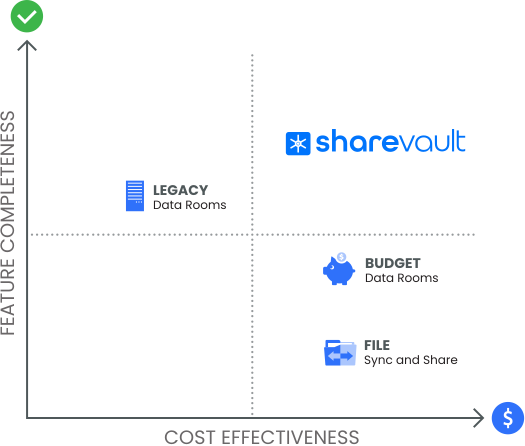
Intralinks, Merrill Datasite and RR Donnelly (DFIN) Venue are legacy virtual data room solutions based on dated technology, resulting in a clunky user experience, more limited functionality and higher overall cost. Based on obsolete pricing models, gouging is common among legacy dataroom providers, particularly related to usage overages and throttling, which is why customers appreciate ShareVault’s transparent pricing.
Display a detailed competitive comparison to ShareVault.
ShareVault vs Intralinks
Intralinks is a virtual data room company like ShareVault, but has a non-intuitive user interface, limited flexibility, and lacks important capabilities. It also charges twice as much as ShareVault.
Customers upgrade from Intralinks to ShareVault to benefit from an improved user experience and enhanced features and functionality that boost productivity. Check out the following competitive matrix!.
ShareVault Major Advantages:
- Ultra-secure Document Sharing
- Connectors for Integration with file sharing platforms and DocuSign
- Customizable Pricing Plans
- Inter-Document Hyperlinking
- Video Watermarking
- User Activity Monitoring and Reporting
- … and much more (listed below)
ShareVault vs Intralinks
ShareVault
Intralinks
File Protection – Maintain control of your sensitive content with bank-grade security.
Granular Access Control - provides fine-grained user/group access permissions
Document permissioning at the user or group level, as well as at the document or folder (tag) level, so you can set permissions precisely according to your requirements. For some data rooms, such as IntraLinks, folder-level permissioning is an expensive option, and without it you will be forced to configure permissions for each and every document, which is very difficult to setup and maintain.
Optional
Disable Print, Save & Copy - prevents unauthorized sharing of content
With separate controls over whether a user has the permissions to save a file, print a document, and/or copy text, you can be sure that your content remains under your control.
Custom Security Policies - fully configurable protection for individual files
Most data rooms are limited to view, print and save. ShareVault enables full customization of the protection settings for each policy, and you can easily assign the appropriate policies for different users / groups and files / folders (tags), so you can customize the appropriate level of protection, based on your business requirements, for different users, groups, tags (folders), and/or files.
Customizable Dynamic Watermarking - timestamps user identity on documents all-or-nothing configuration
Puts a watermark with the user’s identity, IP address and timestamp on viewed, downloaded and printed documents. This serves as an effective deterrent against document distribution (digital or in print) to unauthorized readers. ShareVault administrators can set up separate watermark configurations for each policy, so you can enable/disable watermarking or change the font/color/opacity of the watermarks for different files, tags (folders), users or groups, whereas competitors require you to contact the support team to configure an all-or-nothing watermark configuration.
All-or-nothing configuration
Information Rights Management (IRM) - allows admin to remotely shred downloaded documents
With no clunky plug-ins to install, ShareVault’s powerful IRM technology gives you persistent control over a users’s right to open documents downloaded from ShareVault, so you can unshare files at any time.
Offline Viewing - lets users open protected files while offline
Apply IRM protection to documents for viewing for a limited time by users who do not have internet access, for example during a flight, while still maintaining control over confidential documents, and still tracking user activity.
Configurable Expiration - sets relative or absolute file expiration dates
Enforce deadlines by using the expiration feature to set an absolute or relative expiration date, after which document access rights will expire for the applicable users / groups.
Secure Print - allows users to print on paper while preventing printing to PDF
Some users will insist on having the ability to print, but printing to PDF gives users the ability to save a digital copy of the file. ShareVault is the only VDR that can allow printing to physical printers, while preventing printing to PDF.
Media File Protection - secures playback of A/V files no video watermarking
Media files, such as audio and video files, can be securely shared using the browser-based secure media player that prevents media download and can even apply tamper-proof video watermarking.
No video watermarking.
Screen Capture Blocking - prevents screenshots, screen recordings & screen sharing
ShareVault is the only available virtual data room solution that can block users from taking screenshots or recording the screen while viewing documents on Windows, Mac, iOS and Android.
Not supported for PDF.
Content Organization – Your content is organized in a clear way that is easy to navigate.
Hierarchical Tags - place a document in multiple places in your hierarchy
Only ShareVault organizes content with hierarchical tags, which are like folders, but more flexible. They let users access the same document in multiple locations in your document hierarchy. You can drag-and-drop to reorganize the structure, and easily configure permissions and other tag settings.
Zoomable Thumbnails - gives users a quick peek at each document’s first page
ShareVault automatically generates a thumbnail image of each document’s first page, shown zoomed when the user’s cursor hovers on the thumbnail, so users can take a quick look at documents without opening and more quickly find what they’re looking for.
Infinite Scrolling - continuous scrolling eases viewing of long lists of files
ShareVault is the only solution of its kind offering “Infinite Scrolling”, which accelerates the document review process by vastly reducing the amount of clicking required to browse through long lists of files. Competing systems display a limited number of files, one page at a time, and so users are required to repeatedly click through pages of files to find what they are looking for.
Full-text Search - lets users instantly find documents no synopses or hit highlighting
Users can instantly search your entire ShareVault, and see the search results sorted by relevance. The search tool is fully integrated in the documents page, so search results are with synopses and hit highlighting showing how the searched keyword(s) are used in context.
No synopses or hit highlighting
Favorites - gives users a simple way to mark files that they want to focus on
Users can mark a file or folder (tag) with a star to make it a favorite so they can quickly find it later. In a large data room, this handy feature can be a significant time-saver for your end users, enabling them to quickly locate their favorite files and tags.
Smart Filters - convenient filters help users find what they’re looking for limited
Users can instantly filter files in the document list based on a variety of filtering criteria, such as date / time uploaded, user who uploaded, file type, already viewed / not yet viewed. Other data rooms provide only limited filtering and do not provide as many filtering criteria.
Limited
Drag-and-drop Reordering - lets you quickly and easily reorganize your index
Reordering the files and folders (tags) in your hierarchical index using drag-and-drop makes it quick and easy to organize your content the way you want.
Index Auto-numbering - automates the numbering of hierarchical index
ShareVault can automatically number your indexed hierarchy, so that as you add new folders (tags), or use drag-and-drop reordering, the numbering automatically updates. Due Diligence lists are traditionally numbered in this fashion, so this feature is a significant timesaver during due diligence preparation.
User Activity Analytics - Gain insights on each user’s level of interest, based on their activity - perfect for audit reports.
Hierarchical Tags - place a document in multiple places in your hierarchy
Only ShareVault organizes content with hierarchical tags, which are like folders, but more flexible. They let users access the same document in multiple locations in your document hierarchy. You can drag-and-drop to reorganize the structure, and easily configure permissions and other tag settings.
limited
Comprehensive Activity Logging - records all user activity for 100% auditability
While other data rooms only record certain limited activities, such as logins, uploads and documents viewed, ShareVault records every single activity, including administrator activity, so you will know exactly who did what and when in your ShareVault. From changing a group’s permissions, to adding a user to a group, renaming a file or modifying an expiration date, each and every user activity is recorded with a timestamp, providing for comprehensive traceabiliy so you can answer any question an auditor might ask.
limited
Page Monitoring - accurately tracks user viewing activity down to the page level
With page-level monitoring, you\’ll know which users viewed what pages, and when. Knowing the percentage of pages reviewed gives you additional insight into user engagement.
View-time Monitoring - measures user engagement by measuring viewing time
Sharevault accurately measures each user’s time spent actively scrolling through the pages of each document, or which portions of a video’s timeline have been played, so you can precisely determine which users are actively engaging with your content.
IP Address Tracking - tracks your users’ locations via their IP addresses
IP address tracking enables you to track the IP addresses of your users, using built-in reverse IP lookup to show company and location, when available.
Scheduled Reports - configures and distributes periodic automated reports
You can generate a customized report and distribute it by email to multiple ShareVault users, one time or on a regular schedule.
SIEM Integration - collects ShareVault user activity events in your SIEM
ShareVault can be integrated with your enterprise Security Information and Event Management (SIEM) so that ShareVault user activity events can be sent as a realtime data feed for analytics. SIEM integration is a security best practice required by the most demanding enterprise infosec teams.
User Experience – Streamline your sharing project with a fast and intuitive user experience.
All Major Browsers - users can confidently use their favorite browser to access your sharing project
The ShareVault web app supports all major browsers, including Google Chrome, Mozilla FireFox, Microsoft Edge (version 79+) and Safari.
Build-in Help - learn as you go with integrated, role-specific help modules
ShareVault’s Built-in help module, not a separate help portal, lets you find help on any topic quickly. Searchable, smart help pages give you the right content based on your role and your ShareVault configuration. In addition, video tutorials show you how easy it is to use ShareVault. And if you need help from a real person, our 24/7 support team is ready to help you.
PDF manuals only
Q&A Module - access answers to frequently asked questions or submit questions to your team
ShareVault’s powerful Q & A option features include privacy settings, threaded discussions and file attachments. At any time, you can export a consolidated Q & A audit trail, showing all the questions and the corresponding answers.
Q&A Workflow - Q&A workflows for forwarding questions to experts
With the Q&A workflow feature, moderators can use role-based workflows to forward questions to appropriate subject matter experts, and then approve or reject the response before replying to the end user.
Batch Download - lets users with appropriate rights download files in bulk
The batch download feature allows users with permission to save files to do so rapidly and in bulk, even for IRM-protected files and even for thousands of selected files.
requires special .NET application
Batch Print - allows privileged users to print a set of documents all at once
Users with print rights can print documents as a batch, complete with cover sheet, table of contents, page numbers & separator pages. Supports the Secure Print feature to prevent printing to PDF.
requires special .NET application
Internet Data Transfer Acceleration - optimized performance worldwide
ShareVault’s internet data transfer speed, vital for snappy document viewing and quick uploads, is optimized worldwide, even in China.
Blackout Screen - maintains a user’s last place so they can return to it fast
When a user’s session expires due to inactivity, other competing systems kick out the user to the login page, so the user has to start over. ShareVault displays a secure black-out screen when the session times-out, over the current page being viewed. A user just reenters their password to return to where they left off, and avoids the hassle of navigating back to where they were after login.
Content Viewing – Intuitive file viewers and readers let users view your content with ease.
Web Document Viewer - fast, high-fidelity document viewing right in the browser
The Secure Web Viewer is a browser-based document viewer that securely displays documents right within the ShareVault web application. Because document text is encrypted, users cannot copy it from the browser, and watermark anti-tampering countermeasures prevent removal of watermarking.
No text encryption
Web Spreadsheet Viewer - displays excel spreadsheets securely in any browser
ShareVault’s spreadsheet viewer securely displays Excel files right in your users’ browser, so your end users can quickly and easily view spreadsheets with secure protection.
Secure A/V Player - enables secure streaming of your audio and video files
ShareVault’s secure audio / video player plays back A/V files securely in your end user’s browser using Apple’s HLS live-stream video protocol for high fidelity. A/V files are rights managed for security, and you can apply dynamic watermarks to your videos for additional security.
No synopses or hit highlighting
Responsive Mobile Apps - support for Android and iOS smartphones & tablets
With support for both native mobile apps and mobile web apps, ShareVault is fully responsive and adapts dynamically to the capabilities of your users’ preferred devices. On tablets users get virtually all of the functionality available the our desktop web application, while on smarphones, it adapts to the smaller screen size to provide essential functions.
Document Linking - preserves inter-document hyperlinks
Other data rooms do not support document hyperlinking, so if you upload hyperlinked documents (such as regulatory submissions), users are forced to hunt for referred documents. With ShareVault, users can just click the hyperlink, and the appropriate document opens in the secure document viewer.
Setup and Administration - Get started and configure your data room with less effort than other VDRs.
Drag-and-Drop Upload - upload multiple files & folders right in your browser
Our powerful batch upload tools works directly from within your browser for effortless drag-and-drop uploading with nothing to install.
Upload Auto-Unzip - save setup time by uploading zipped files and folders
If your folder structure is in a zip file, you can save time by uploading the zip file. When you do, you’ll have the option to automatically unzip the files and folders, preserving the same hierarchial structure, which can save you time and effort.
View as Another User - check the end user experience to confirm your setup
The “View As” feature is a valuable tool for checking and confirming the user experience prior to inviting your users to a new ShareVault.
Scheduled User Actions - automates user administration tasks
You can configure ShareVault to invite, lock or unlock user(s) at a date and time of your choosing, so you can schedule in advance and let our automation take care of perfectly-timed actions.
Account Admin Tool - create and manage multiple data rooms
The Account Administrator tool, offered with ShareVault Enterprise, allows you to create and manage multiple ShareVaults with ease, so you you can administer your own data rooms exactly how you wish without having to explain what you want to a support person.
Platform Integration – Enjoy seamless integration with your existing software workflows.
Connector for SharePoint
Other data rooms either cannot connect to SharePoint at all, or support only on-prem SharePoint integration requiring installation of server-side code. Only ShareVault can connect to SharePoint, via the Microsoft Graph API, so you can upload or sync files directly from SharePoint into ShareVault, while preserving your hierarchical structure of sites, document libraries, and folders.
Requires server install
Connector for OneDrive
Only ShareVault can connect to OneDrive, via the Microsoft Graph API, so you can upload or sync files directly from OneDrive into ShareVault, while preserving your hierarchical folder structure.
Connector for Google Drive
Only ShareVault can connect to Google Drive, so you can upload or sync files directly from Google Drive into ShareVault, while preserving your hierarchical folder structure.
Connector for Box
Only ShareVault can connect to Box, via the Box API, so you can upload or sync files directly from Box into ShareVault, while preserving your hierarchical folder structure.
Connector for DropBox
Only ShareVault can connect to Dropbox, via the Dropbox API, so you can upload or sync files directly from Dropbox into ShareVault, while preserving your hierarchical folder structure.
Connector for DocuSign
Only ShareVault can connect to DocuSign, using the DocuSign API, to initiate e-signature workflows from right within ShareVault. After completion of the e-signature workflow, the signed document returns to ShareVault for record keeping purposes.
RESTful API (Application Program Interface)
ShareVault’s RESTful API allows for programmatic control of your ShareVault, with over 30 APIs allowing for deep integration with your corporate workflows.
Single Sign-On (SSO)
ShareVault integrates directly with Okta, Azure AD, Google Cloud Identity, or any SAML2 compatible identity provider, to allow your users to directly login to ShareVault without separately authenticating, providing for enhanced convenience and improved IT governance.
Platform Security – Bank-grade security, availability and compliance across redundant data centers.
Secure, High Availability Architecture - dedicated instances in redundant VPCs
ShareVault is hosted on dedicated instances in virtual private clouds (VPCs) within geographically redundant data centers with real-time failover in the event of a failure.
Infosec Standards Compliance - ISO-27001, 21 CFR Part 11, and other standards
ShareVault is certified for ISO-27001 and validated for 21 CFR Part 11, and our data centers are certified for other relevant information security standards, including SOC 1/2/3, SOC, HIPAA, HITRUST and other important security standards, providing assurance that trusted third parties have verified adherence to industry standard security controls and their verification.
GDPR, CCPA, and PrivacyShield - compliance with data privacy standards
ShareVault complies with both GDPR and CCPA privacy standards and is self-certified for the EU-U.S. and Swiss-U.S. Privacy Shield frameworks. For more information, please refer to our privacy policy.
Two-Factor Authentication - for streamlined bank-grade user authentication
ShareVault’s two-step verification enhances security for your users with an easy and unobtrusive authentication process that supports login code delivery via SMS, phone or authenticator apps.
Customer-managed Keys - for compliance with strict data security standards
ShareVault offers customer managed keys (CMK) as an advanced security option, including support for “bring your own key” (BYOK), for applications that are held to the strictest data security standards. ShareVault’s CMK implementation provides the benefits of a Hardware Security Module (HSM) without the hassle of having to deploy and maintain it yourself. Our competitors who offer CMK (most don’t) require deployment of an HSM, which is both complex and expensive.
Requires special hardware
Life Sciences Features – These features are why BIO has selected ShareVault as their exclusive data room partner.
Inter-Document Hyperlinking - for faster review of regulatory submissions
Regulatory submission documents, such as those in an eCTD hierarchy, often contain hyperlinks to other submitted documents. The time saving, inter-document hyperlinking feature preserves these internal document links, ensuring the right document opens when the link is clicked. Without this feature, your users will have to hunt for each linked document, which can add hours to due diligence timelines.
eCTD Viewer - plugin-free integration with industry-leading eCTD viewer
ShareVault is the only virtual data room that integrates with an eCTD viewer so that you can share your submission for more efficient review while keeping the documents secure.
SAS Auto-conversion - converts SAS analytics files into PDF for viewing
SAS Analytics files, including SAS, SSD01, XPT and SAS7BDAT files frequently used for statistical studies in life sciences and other scientifc applications, are automatically converted to PDF for secure viewing by end users.
Prism Auto-conversion - converts GraphPad Prism files into PDF for viewing
Graphpad Prism files, frequently used for analysis and graphing in life sciences and other scientifc applications, are automatically converted to PDF for secure viewing by end users.
HIPAA Compliant Infrastructure - ShareVault data centers are certified for HIPAA compliance
ShareVault data centers are certified to comply with the Health Insurance Portability and Accountability Act (HIPAA).
21 CFR Part 11 - available 21 CFR part 11 compliance validation
The available Title 21 CFR Part 11 Compliance Validation package helps ShareVault customers comply with this important FDA regulation, assuring audit readiness, and includes delivery of a validation package with every release, so your business is able to conduct mock audits and validate compliance.
Service & Support – Award-winning 24/7 support to make your project a complete success.
24/7/365 User Support
Your users can call or email our 24/7/365 support team for questions or assitance.
One-on-one Training and Dedicated Project Management
A project manager will provide one-on-one administrator training and proactive project support to ensure your deployment goes smoothly and meets your goals.
NOTE: Some ShareVault features in the above matrices are not available in all plans.
View Specifics Here